SCOM 2012 Powershell Script to Backup Unsealed Management Packs

Sure there’s plenty out there already. But my does it out of the box. Run it from wherever on the management server and it will create a folder called C:\UnsealedBackup\<date> and dump the unsealed management packs in there. Nice and neat, run it every day after you eat your Wheaties. Or just schedule it with Task Scheduler. But either way, Wheaties are tasty.

# Written by J. Clarke to automated the backup of unsealed management packs.
# Version 1.0
Import-Module OperationsManager
$Date = Get-Date -Format “yyyy-MM-dd”
$TodaysFolder = “C:\UnsealedBackup\” + $Date
New-Item $TodaysFolder -type directory -force
Get-SCOMManagementPack | where {$_.Sealed -eq $false} | export-SCOMmanagementpack -path $TodaysFolder

SCOM 2012 AD integration not populating in AD

So I’ve got a little SCOM 2012 lab. One DC, two database servers, four management servers, one Exchange 2010 and one soon to be SharePoint 2010 server.

The summary of what I was experiencing was that when I configured AD integration using the wizard in the SCOM console, nothing was populated into AD even an hour later, and no manually installed agents are automatically assigned as a result, even after properly using the Mom AD Admin EXE to prepare active directory.

The end result was the client can’t find a policy in AD as shown below.

Event 2011: The Health Service did not find any policy in Active Directory

image

In active directory users and computers, none of my management servers were populating underneath the Operations Management \ Mario, and each of them should have their own corresponding containers and AD groups if all is working properly.

image

I tried several things with no luck:

  1. Verifying I had properly run the MOMADAdmin.exe with the proper switches: MOMADAdmin.exe <ManagementGroupName> <MOMAdminSecurityGroup> < RunAsAccount> <Domain>
  2. Completely loosening permissions on the OperationsManager container and child objects (Sidebar: NEVER EVER DO THIS, read this article to see why)
  3. Selecting a different runas account and profile ensure full domain admin rights
  4. Restarting client agents, servers and DCs
  5. Verified my LDAP inclusion query was valid by using Active Directory Users and Computers advanced search
  6. Telling my laptop “You look fat compared to the new macbooks” to hurt its feelings.

None of the above worked. After letting it bake overnight, a call with Microsoft the following morning and a refresh of ADUC indeed verified that you should plan on waiting at least 24 hours for that to be updated in AD with 2012, a change from 1 hour since 2007. When I came in the next morning, everything was working as shown below. You can look for the operations manager event 11470 on the management servers to verify successful publishing to AD.

image

Here are some good articles on AD integration with SCOM as a bonus. Hooray for bonuses!

AD Integration Considerations– My quick summary of this article is: don’t use AD integration unless you’re really sure you need to. Why not just use the command line if you’re going to bake it into your base images? Really the only time you need this is if you have multiple separate management groups in the same large domain.

http://blogs.technet.com/b/jonathanalmquist/archive/2010/06/14/ad-integration-considerations.aspx

Integrating Active Directory and Operations Manager

http://technet.microsoft.com/en-us/library/hh212829

Understanding How AD Integration Works with OpsMgr 2007

http://blogs.technet.com/b/momteam/archive/2008/01/02/understanding-how-active-directory-integration-feature-works-in-opsmgr-2007.aspx

0x800700A1 when running command line task in SCCM 2012 OSD

Today in my SCCM 2012 lab I was troubleshooting a task sequence error in regards to source being unavailable. It is a very simple task sequence deploying Windows 7, the only custom step I placed in it was a vbscript I wrote to programatically determine or prompt for the computer name. The error was immediately presenting as soon as my “Run Command Line” task came up. Upon hitting F8 and running CMtrace (thank you Microsoft for putting that in the boot images natively!) I navigated to the SMSTS log found at X:\Windows\TEMP\SMSTS\smsts.log (while in the PE)

task sequence failed to resolve the source for SMS PKGID= 0x800700a1

Here’s what I looked at:

  1. Made sure that I had configured the network access account for the site
  2. Made sure my package had been distributed to the distribution point
  3. Made sure I could access it from the distribution point with the NAA account..wait a second, where is it anyway in 2012?

Here is where some reading may be required. Here is an article that regards the differences between the content library in 2012 and how packages were distributed in 2007. http://blogs.technet.com/b/hhoy/archive/2012/05/31/an-adventure-in-the-sccmcontentlib-single-instance-store.aspx

In the end, I had to ensure all packages referenced by the task sequence were in fact being copied to shares on the distribution point.  For this specific example I chose a specific share, but you shouldn’t have to do that.

Once I made that change, the task sequence deployment option could be set to “Access content directly from a distribution point when needed by the running task sequence”.  I needed to this because when running a task that needs to access package content before the local disk is partitioned there is nowhere to download the data to, so it must be run directly from the distribution point.

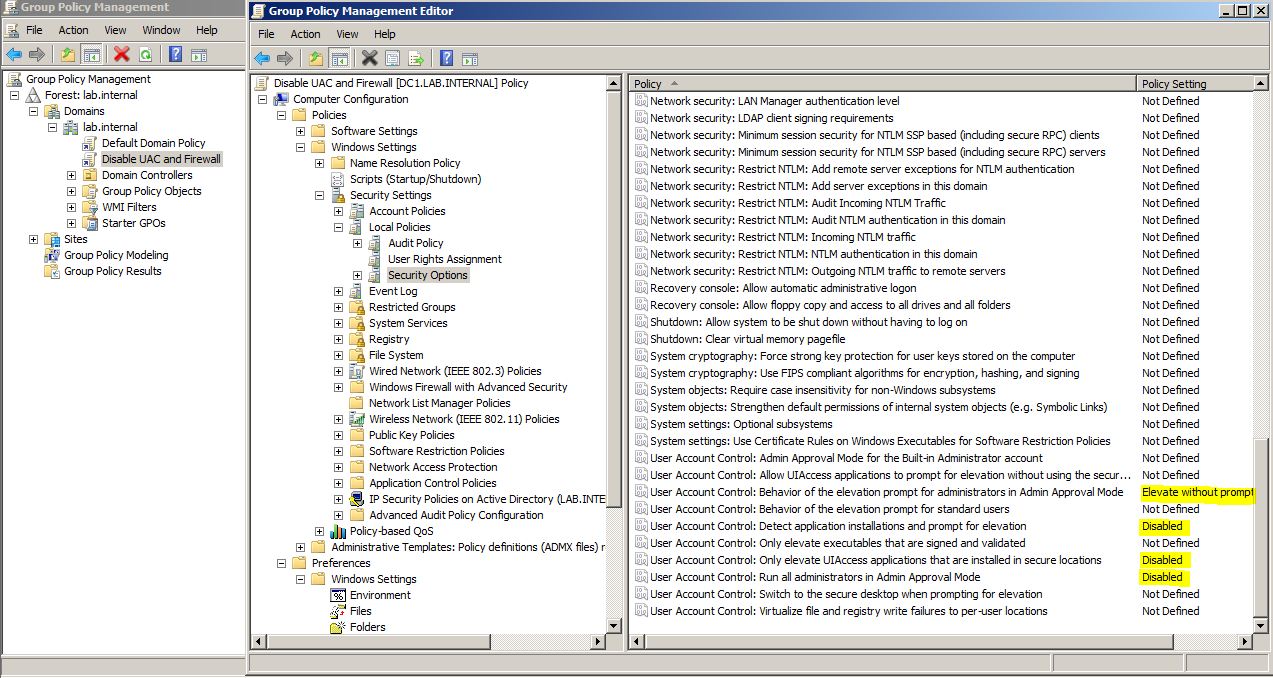
How do I turn off UAC with group policy?

Go away UAC! Nobody likes you! When I do leave it enabled most of the time I do end up feeling like poor PC in this Mac commercial. Mac has issued a salutation cancel or allow

Well not really, I dress much nicer than PC. But in my humble opinion, until UAC capability is beefed up so administrators can whitelist process names for automatic elevation, there are plenty of cases where it needs to be turned off when weighed against legacy application and OS manageability requirements.

If you want to disable it, the best method is group policy. Here’s how you do it. Hope this helps someone.