
I ran into an interesting issue recently during a View deployment for a customer that was making use of VMware View 5.1.1, Imprivata OneSign 4.6 Hotfix 11, and Meditech EMR with Forward Advantage’s Authentication Manager product for ProveID.
Now, some of you may not know about this ProveID, what is it, and why are we even bothering it? Well, here in the great state of Ohio (and several other states), doctors and nurses are legally required to prove their identity during an EMR (Electronic Medical Record) clinical workflow which results in either the signing of a medication order or the distribution of a medication. This is because if a nurse or doctor were to leave their workstation unlocked, anyone who could walk up to the workstation could purposefully or accidentally sign a medication order or give a medication, while behaving as someone else. This is ESPECIALLY important when it comes to the authorization of medication. The difference between the great state of Ohio and other states, is that password alone has been deemed by the Ohio Board of Pharmacy not enough security for the ProveID workflow, and that some form of Biometric, Token or other dual-factor authentication is required to ensure that the person is who they say they are. Now, enough of that tangent.
For this particular client, the Windows XP golden images were set, the pools had been configured, and the Imprivata VDI integration module was integrated and activated. Some of you guys who are VMware junkies may not know what functionality the Imprivata product brings to the table. Check out this drawing I made which basically outlines the functionality that it brings from a SSO and Clinical logon workflow perspective. Here is a drawing I put together that shows the average logon process with Imprivata integration.
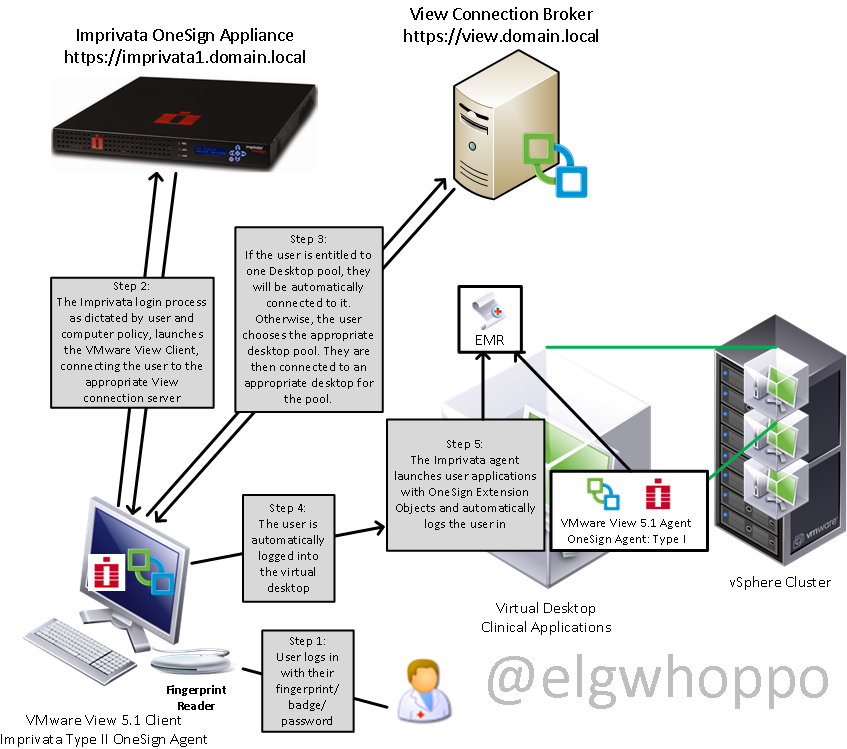
Now, keep in mind, the above flowchart is just the process for getting logged in. That process works just fine regardless of the connection protocol. The next drawing is specifically about what happens when a ProveID event takes place, where a person needs to prove their identity specifically in this case with biometrics. It should be noted that the 3rd party authentication software isn’t always needed if Imprivata has native support for ProveID actions in their application. In this case, a third party product was required.

This is how it should look when it is working. The problem I had with the customer was that when using PCoIP, during step #4, where the fingerprint data was being sent back to the VM. Here is where if the virtual channel between the endpoint and the VM was broken, the communication which passes the fingerprint data back would not function, and result in a broken workflow and a “disconnected fingerprint reader” error message in the VM. Another impact of the virtual channel breaking was that if a lock command was sent to the VM, it would only lock the VM and not the endpoint. We often found that when the error was occurring sporadically, it most frequently occurred the first time that a user logged onto a VM that they hadn’t previously logged onto, but individual results varied.
- First we tried using the OneSign 4.6 HF11 agent and a Windows XP View 5.1.1 pool with PCoIP as the required protocol. ProveID did not function with the biometric readers.
- Second, we tried using the OneSign 4.6 HF11 agent and a Windows XP View 5.1.1. pool with RDP as the required protocol. ProveID did not function with the biometric readers.
- Third, we tried using the OneSign 4.6 HF5 agent and a Windows XP View 5.1.1 pool with PCoIP as the default protocol. ProveID sporadically functioned with the biometric readers.
- Finally, we tried using the OneSign 4.6 HF5 agent and a Windows XP View 5.1.1 pool with RDP as the default protocol. ProveID consistently functioned as shown in the workflow above.
At least in the situation I was in, I believe we isolated the issue down to a defect with the Imprivata agent that is only exposed when using VMware View 5.1.1 Windows XP pools with PCoIP, and Biometrics for ProveID workflows. The ticket with Imprivata is still open, so the jury is still out, but I think we narrowed it pretty far.
Also as a bonus:
Don’t forget what PCoIP looks like from a stack perspective. To get a quick look at what the PCoIP network stack looks like, check out this article that Andre Leibovici,wrote on disabling the clipboard transfer with View, there is a great graphic on there that highlights how it’s broken down. http://myvirtualcloud.net/?p=927
Hope this helps someone understand the madness that is the ProveID workflow shanagins. I will post an update when we get a final answer as to the root cause.
** Update **
This ultimately was happening because Imprivata 4.6 HF11 was not yet certified for VMware View 5.1.1. After talking to a friend of mine who attended HIMMS, I learned View 5.1.2 it is currently scheduled to be certified by mid-april.

 elgwhoppo's vNotebook